Whitepaper
Social Media Security Checklist: 10 Steps to Secure Your Company's Accounts
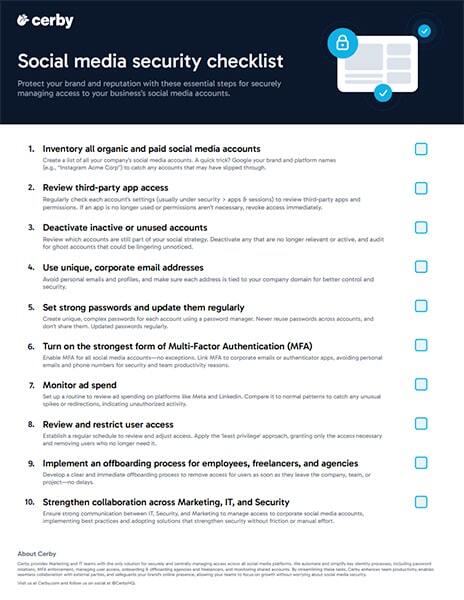
Corporate social media accounts sit outside most identity tools, so they end up protected by shared passwords, personal-device MFA, and informal access, which is exactly how brands get compromised. Use this 10-step checklist to bring your organic and paid social accounts under proper control, across employees, agencies, and freelancers.
1. Inventory all organic and paid social media accounts
List every account your company owns. A quick trick: search your brand plus each platform name (for example, "Instagram Acme Corp") to surface accounts that slipped through.
2. Review third-party app access
Check each account's connected apps and sessions, and revoke any integration that is no longer used or over-permissioned.
3. Deactivate inactive or unused accounts
Retire accounts that are no longer part of your strategy, and audit for ghost accounts lingering unnoticed.
4. Use unique, corporate email addresses
Tie each account to your company domain instead of personal emails, so ownership and recovery stay under IT control.
5. Set strong, unique passwords and rotate them
Use a password manager to give every account a unique, complex password, never reused or shared, and rotate them on a schedule.
6. Enforce the strongest available MFA
Turn on MFA for every account with no exceptions, linked to corporate email or an authenticator app rather than personal phones.
7. Monitor ad spend
Review ad spending on platforms like Meta and LinkedIn against normal patterns to catch spikes or redirects that signal unauthorized access.
8. Review and restrict user access
Apply least privilege: grant only the access each person needs and remove users who no longer need it, on a regular schedule.
9. Offboard employees, freelancers, and agencies immediately
Remove access the moment someone leaves the company, team, or project, with no delay, so no former insider or agency keeps the keys.
10. Strengthen collaboration across Marketing, IT, and Security
Align these teams on who manages access, and adopt automation so the steps above hold without manual effort or friction.
Doing this manually across dozens of accounts and outside agencies is where it breaks down. Cerby automates the hardest steps, enforcing MFA, rotating credentials, and granting or revoking access as people join, move, or leave, so your social accounts stay secure without slowing marketing down.
Prefer a version to save or share? Download the checklist as a PDF: Social Media Security Checklist (PDF)